

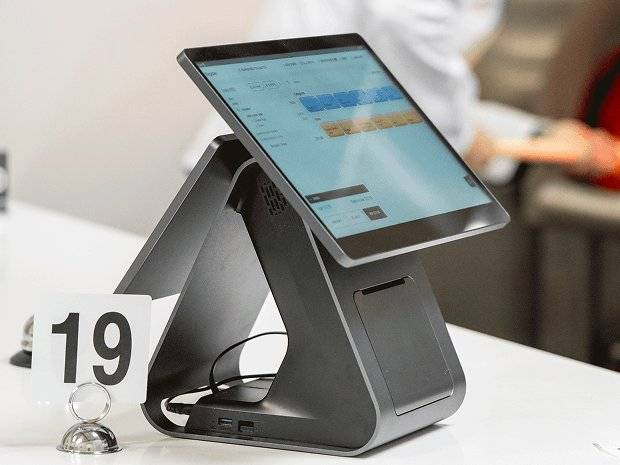
For JohnPaul Arabome, Clover vs. TouchBistro vs. Orders.co POS is not a theoretical comparison. He has run his restaurants on all three.
JohnPaul owns Jagabans LA and The Peppered Goat, two Nigerian restaurants in Los Angeles. He spent about two years on Clover, then moved to TouchBistro for lower fees. Both times, he ran into the same core problem: when something broke, getting help was hard.
Today his restaurants run on the Orders.co POS. He names three reasons he is staying: availability, simplicity, and cost.
Jagabans LA and The Peppered Goat at a glance
| Detail | Jagabans LA and The Peppered Goat |
|---|---|
| Owner | JohnPaul Arabome |
| Cuisine and city | Nigerian, Los Angeles |
| Previous POS systems | Clover (about two years), then TouchBistro |
| Main problems before | Hard-to-reach support, payment sync errors, a DoorDash integration issue that took about two months to fix |
| Setup on Orders.co | About 30 minutes, done by JohnPaul himself |
| What he values most | Availability, simplicity, cost |
Clover vs. TouchBistro vs. Orders.co: one owner’s side-by-side
Each system solved some problems and created others. Here is how JohnPaul describes his experience with each one.
| What he compared | Clover | TouchBistro | Orders.co |
|---|---|---|---|
| Fees | Higher than TouchBistro, in his experience | Lower than Clover, which is why he switched | Pricing was one of his top three reasons for choosing us |
| Getting help | Hard to get help when he needed it | Extremely difficult to reach support | A team he can reach, including his account contact and the menu team |
| Biggest issue he hit | A DoorDash integration problem that took about two months to resolve | The terminal showed payments as approved while the POS showed an error | No major issues; his only request was quieter notification sounds |
This table reflects one owner’s experience at his own restaurants. It is not a full feature or pricing review. For that, see our comparison of Toast vs Square vs Clover vs Orders.co.
Why he left Clover: a two-month DoorDash integration problem
JohnPaul used Clover for about two years. It was part of his operation for a long time, but getting help when something went wrong was a recurring challenge.
The issue that decided it was a DoorDash integration problem at one of his restaurants. It took about two months to resolve.
Two months is a long time to run a restaurant with an open problem on a delivery channel. It can mean missed orders, lost sales, and hours spent trying to find out where things broke. That experience played a major role in his decision to leave.
Why TouchBistro did not work out: payment errors and hard-to-reach support
TouchBistro charged lower fees than Clover, which made it an appealing next step. The experience did not match the price.
Two problems stood out:
- Support was extremely hard to reach. When something went wrong, JohnPaul struggled to get through to anyone who could help.
- The terminal and the POS disagreed. A customer would pay, the payment terminal would show the charge as approved, and the POS would show an error.
That second problem left him unsure whether a payment had actually gone through. In some cases, it created the risk of charging a customer twice. Checking recent transactions to sort it out was difficult too.
For an owner, not knowing whether a payment cleared is more than an inconvenience. It puts both the guest experience and the day’s numbers in question.
Why he chose Orders.co POS: “the IT team of my company”
Pricing was part of the appeal. What made the difference was the relationship.
JohnPaul wanted more than software. He wanted people he could reach, talk to, and rely on. That is how he describes working with us:
“I feel like you’re an extension of my company. I feel like you’re the IT team of my company.”
He works with different people on our team depending on the task, including his account contact and our menu team. Support is available 24/7, so help does not stop when business hours do.
As he puts it, it feels like someone is watching his back. For an owner responsible for two locations, that matters as much as any feature.
Setting up Orders.co POS took 30 minutes, not two hours
A new POS can feel like a big project when you are already running two restaurants. For JohnPaul, it was not.
- The hardware arrived within three days.
- Our team offered to walk him through setup and estimated it would take about two hours.
- He decided to try it himself and had everything running in about 30 minutes.
Our hardware ships pre-configured and onboarding happens remotely, with our team available by phone, so there is no technician visit to schedule. JohnPaul did not need the full walkthrough at all.
When we asked how the system was working for his team, his answer was short:
“So easy for me. So easy.”
Hardware and everyday use: nothing he would change
Having used Clover and TouchBistro, JohnPaul had a clear basis for comparison. He described our hardware as perfect and said there was nothing he would change about the setup.
Day to day, the simplicity of the POS is what he notices most. He and his employees can move through the system without extra steps and get on with service.
His one request was to turn down the notification sounds, which is a quick change in the POS settings.
Delivery app integrations with a team that follows up
Third-party ordering integrations were his biggest source of frustration before the switch. An integration problem affects more than the technology. It can mean missed orders, lost sales, and time spent figuring out what went wrong.
On Orders.co, orders from integrated providers like DoorDash, Uber Eats, and Grubhub land in the same All Checks list as POS, website, and kiosk orders. Staff manage them in one workflow instead of switching between devices. That is how our order consolidation works.
What JohnPaul values most is what happens when something does go wrong. He is not left to chase answers alone. Our team helps investigate and follows up when an issue involves another provider. For him, that is the clearest difference from what he experienced before.
Transaction records he can trust after payment sync errors
After the payment problems on TouchBistro, visibility into transactions became a priority.
With Orders.co, JohnPaul can go back into his transaction records and see payment activity, including tips. He can check whether a transaction was charged instead of guessing from two screens that disagree.
For an owner overseeing two locations, that makes daily review faster and gives him more confidence in the numbers.
The real cost of a POS is downtime, not the monthly fee
JohnPaul is careful not to claim he has done a detailed cost breakdown of all three systems. He does make a point most owners will recognize.
The biggest cost is not always the subscription. It is the money and time lost when the system does not work. During the two months the DoorDash issue stayed open on Clover, he believes the business may have missed out on revenue.
That points to a simple rule for comparing systems. A POS that costs a little less each month is not cheaper if one unresolved problem costs you weeks of orders. Weigh two things together: the monthly price, and how quickly problems actually get fixed.
For JohnPaul, peace of mind is a big part of the value. Orders are flowing, issues are being handled, and he is not spending weeks trying to get someone to help.
What to check before you switch POS systems
JohnPaul’s experience points to four questions worth asking any POS provider before you switch:
- How do I reach support during service? Ask whether support is available 24/7 and whether you get named contacts or a general queue.
- What happens when the terminal and the POS disagree? Ask how you confirm a payment went through and how quickly you can look up a recent transaction.
- Who owns integration problems? If DoorDash or another provider stops syncing, ask whether the POS team follows up with that provider or leaves it to you.
- How long does setup take, and who does it? Ask whether hardware ships pre-configured and whether you need a technician on site.
Would JohnPaul recommend Orders.co?
Yes. He is already recommending Orders.co to other restaurant owners.
For him, leaving Clover and TouchBistro came down to finding a system that makes running two restaurants easier, backed by a team he can actually reach. He now has better visibility into transactions and the reassurance that someone is looking out for the business.
When we asked about the future of the relationship, he said:
“I’m gonna keep you all for a long time, forever.”
Running into the same problems with your POS?
If you are spending weeks chasing support, second-guessing payments, or untangling integration issues, it may be time for a different setup. Schedule a demo and we will walk you through how the Orders.co POS would work for your restaurant.
Frequently asked questions
Do I have to replace my current POS to use Orders.co?
No. You can run Orders.co alongside the POS you already have, or use it as your POS. You do not have to replace everything on day one.
Can Orders.co help move my menu over from Clover?
Yes. We handle migrations from common systems, including Clover. Our team can also help create, edit, and maintain your menu through centralized menu management, so your POS, website, and delivery app menus are updated from one place.
Is Orders.co built for restaurants with more than one location?
Yes. Orders.co is designed for independent restaurants with one to four locations and small chains with five to 20. The All Checks view can bring together orders from every business you run, including virtual brands.
Can I control which employees issue refunds or discounts?
Yes. Permissions are set by job title. Each action can be allowed, blocked, or set to require an authorized employee’s PIN, which covers discounts, refunds, cash drawer access, and other sensitive operations.

