


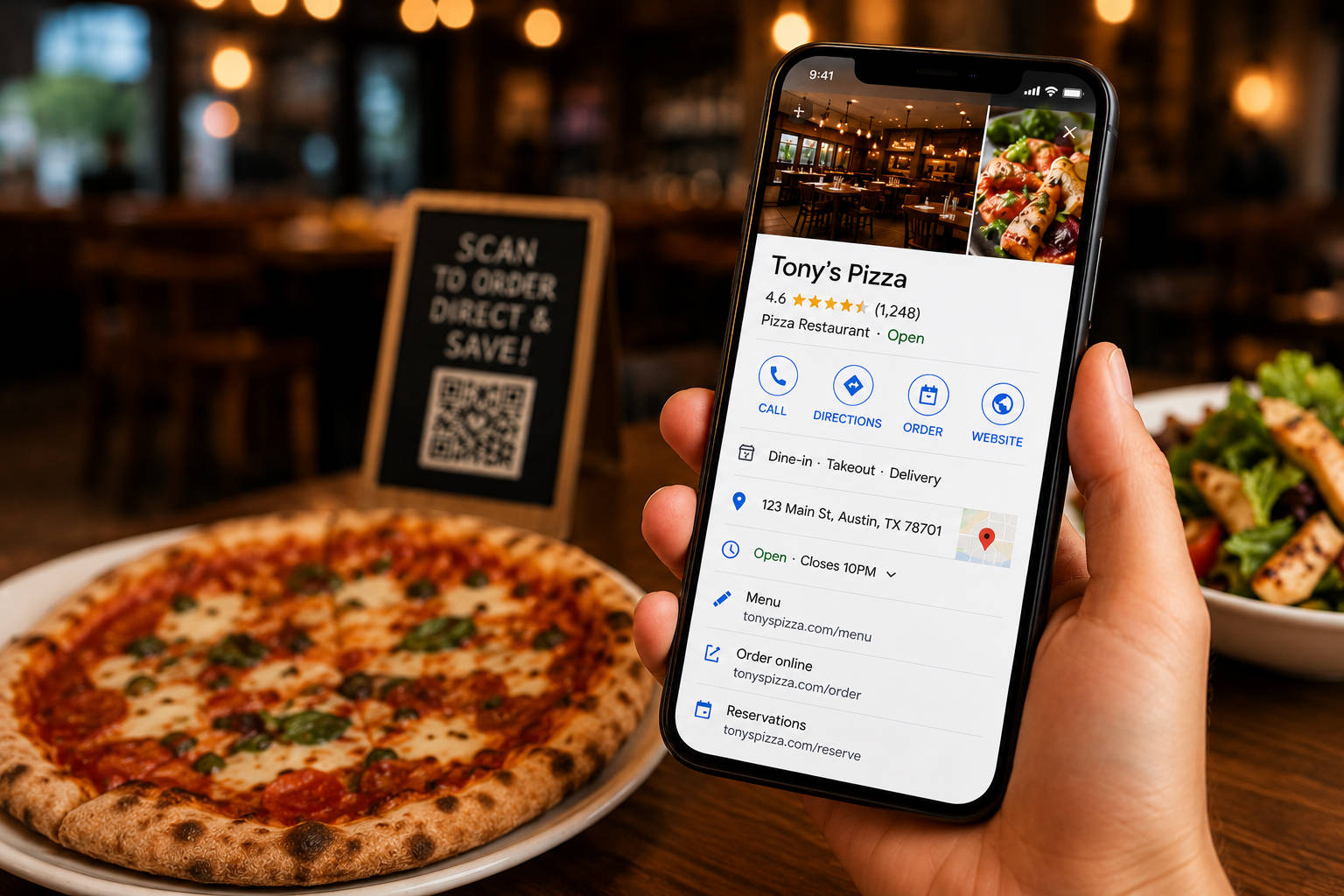
A well-optimized restaurant Google Business Profile can help you get more calls, more direction requests, more reservations, more reviews, more direct orders, and more repeat customers. A neglected profile can have the opposite effect. Wrong hours, outdated menu items, low-quality photos, unanswered reviews, missing ordering links, or commission-based marketplace links can quietly leak revenue every day.
This guide breaks down how to optimize a Google Business Profile for restaurants in 2026, with a practical checklist for small- and mid-sized operators who want more visibility and direct customer action.
- What Is a Google Business Profile for Restaurants?
- Why Google Business Profile Matters for Restaurants
- How Google Ranks Local Restaurant Results
- Restaurant Google Business Profile Optimization Checklist
- Step 1: Claim, Verify, and Clean Up Your Profile
- Step 2: Choose the Right Restaurant Categories
- Step 3: Keep Your Hours Accurate
- Step 4: Add the Right Website, Menu, Reservation, and Ordering Links
- Step 5: Optimize Your Restaurant Menu on Google
- Step 6: Write a Better Restaurant Description
- Step 7: Upload Photos That Help Customers Decide
- Step 8: Get More Google Reviews Without Being Pushy
- Step 9: Reply to Reviews Like a Real Restaurant Owner
- Step 10: Use Google Posts for Specials, Events, and Offers
- Step 11: Add Attributes, Services, and Dining Options
- Step 12: Highlight Your Dining Options Clearly
- Step 13: Answer Common Questions with Q&A
- Step 14: Connect GBP to Your Restaurant Website and Location Pages
- Step 15: Track Orders, Calls, Reservations, and Clicks from GBP
- What Common Google Business Profile Mistakes Do Restaurants Make ?
- 30-Day Google Business Profile Optimization Plan for Restaurants
- How Orders.co Helps Restaurants Turn Google Visibility Into Direct Revenue
- Frequently Asked Questions About Google Business Profile for Restaurants
What Is a Google Business Profile for Restaurants?
A Google Business Profile is the business listing that appears when customers find your restaurant on Google Search or Google Maps. It can show your restaurant name, address, phone number, hours, website, menu, photos, reviews, popular times, ordering options, reservation links, attributes, posts, questions and answers, and more.
For restaurants, this profile often becomes the first digital touchpoint in the customer journey.
Before a customer opens your website, downloads your menu, calls your host stand, or places an order, they may already be judging your restaurant based on what they see on Google.
That makes your profile one of the most important pieces of your restaurant’s local marketing.
Why Google Business Profile Matters for Restaurants
Your Google Business Profile is often your digital front door. It shows up when customers search for high-intent queries like:
- “restaurants near me”
- “best pizza open now”
- “[restaurant name] menu”
- “[restaurant name] order online”
- “coffee shop near me”
- “catering near me”
- “takeout near me”
- “brunch near me”
- “family restaurant near me”
A strong profile influences whether someone calls, asks for directions, views your menu, places an order, books a table, or chooses a competitor.
For small and mid-sized restaurants, this matters even more. You may not have a large ad budget, a custom app, or a full marketing team. But you do have customers searching for you on Google. The question is whether that traffic is helping your restaurant grow, or leaking into outdated menus, disconnected links, and third-party marketplaces.
That is where a connected platform like Orders.co can help. Google helps customers find your restaurant. Orders.co helps turn that visibility into direct orders, customer data, loyalty, reviews, and repeat business.
How Google Ranks Local Restaurant Results
Google’s local ranking system is commonly built around three core factors: relevance, distance, and prominence.
For restaurants, that means your profile needs to answer three questions clearly:
Relevance: Does your restaurant match what the customer is searching for?
This is influenced by your category, menu, description, attributes, services, photos, posts, and overall profile completeness.
Distance: Is your restaurant close enough to the customer or the location they searched?
You cannot control where the customer is located, but you can make sure your address, service area, and location details are accurate.
Prominence: Does your restaurant look trustworthy, active, and well-known?
This can be influenced by reviews, ratings, links, citations, brand mentions, website quality, local content, and overall reputation.
A strong restaurant Google Business Profile does not rely on one trick. It improves every part of the customer journey: discovery, trust, decision-making, ordering, reviews, and repeat visits.
Restaurant Google Business Profile Optimization Checklist
Use this checklist as your foundation:
| Profile area | What to optimize | Why it matters |
| Business name | Use your real restaurant name | Builds trust and avoids policy issues |
| Categories | Choose the most accurate primary and secondary categories | Helps Google understand when to show your profile |
| Address and phone | Keep NAP details consistent everywhere | Reduces customer confusion |
| Hours | Add regular, holiday, seasonal, and special hours | Prevents bad experiences and negative reviews |
| Website link | Send customers to your official website | Helps customers learn more and take action |
| Menu link | Link to a current, mobile-friendly menu | Helps customers decide faster |
| Order link | Use a direct ordering link when possible | Helps protect margin and customer data |
| Reservation link | Add a clear booking path if you accept reservations | Reduces friction for dine-in customers |
| Photos | Upload current food, interior, exterior, and catering photos | Builds trust and increases appetite appeal |
| Reviews | Ask consistently and respond quickly | Improves trust and reputation |
| Posts | Promote specials, events, offers, and direct ordering | Keeps your profile active |
| Q&A | Answer common questions before customers ask | Reduces friction and calls |
| Attributes | Add accurate dining, accessibility, service, and payment details | Helps customers choose confidently |
| Website and location pages | Keep your website consistent with your profile | Strengthens local SEO and conversion |
Step 1: Claim, Verify, and Clean Up Your Profile
Once verified, clean up the basics:
- Restaurant name
- Address
- Phone number
- Website
- Menu link
- Ordering link
- Reservation link
- Business category
- Service area, if you deliver
- Regular hours
- Holiday hours
- Attributes
- Photos
Then check for duplicate profiles. Restaurants often end up with multiple listings after a move, a rebrand, an ownership change, a franchise update, or an old setup. Duplicate listings can split reviews, confuse customers, and weaken trust.
Use your real restaurant name, not a keyword-stuffed version of it. “Tony’s Pizza” is fine. “Tony’s Pizza Best Pizza Delivery Near Me” looks spammy and can create problems.
Your Google Business Profile should reflect how your restaurant appears in the real world: on signage, receipts, your website, social media, and ordering pages.
Accuracy builds trust. If customers see different names, phone numbers, menus, or hours across platforms, they may hesitate before ordering.
Step 2: Choose the Right Restaurant Categories

Categories help Google understand what your restaurant is and which searches your profile should appear for.
Your primary category should describe what your restaurant is primarily about, not every service you offer.
Your secondary categories can support other accurate parts of the business, but avoid adding categories that do not truly describe what customers can expect.
The goal is not to add as many categories as possible. The goal is to help Google and customers understand your restaurant clearly.
Step 3: Keep Your Hours Accurate
Wrong hours are one of the easiest ways to disappoint customers and earn bad reviews.
Keep these updated:

- Regular business hours
- Holiday hours
- Temporary closures
- Seasonal hours
- Weather-related closures
- Brunch hours
- Late-night hours
- Kitchen hours, if different from dining room hours
- Pickup and delivery availability
If a customer drives across town because Google says you are open, but your doors are locked, they may not come back.
This is especially important for small restaurants that change hours based on staffing, holidays, events, or seasons. Customers rely on Google for fast decisions. If your profile is wrong, the customer experience starts with frustration.
Orders.co helps reduce that kind of digital chaos by giving restaurants a more centralized way to manage key information, menus, ordering links, customer engagement, and reviews.
Step 4: Add the Right Website, Menu, Reservation, and Ordering Links
Your links decide where the customer goes next — and where your revenue goes after that.

A restaurant Google Business Profile can include links for:
- Website
- Menu
- Online ordering
- Reservations
- Catering inquiries
- Pickup
- Delivery
Pay close attention to your order link.
If your “Order online” link sends customers to a third-party marketplace, you may be paying commission on customers who were already searching for your restaurant. That customer was not casually discovering you inside a delivery app. They were already looking for you.
A direct ordering link helps you keep more of that value. It gives customers a clear way to order from your branded website while helping your restaurant maintain customer relationships, order data, and repeat marketing opportunities.
For restaurants using Orders.co, the Google Business Profile order link should point to the restaurant’s own branded, commission-free ordering page whenever possible. Orders.co helps small and mid-sized restaurants turn high-intent Google traffic into direct orders by connecting customers to your live menu, online ordering, loyalty tools, and customer data.
A simple rule: if a customer searches your restaurant by name, they should not have to order from you through a marketplace.
A better flow looks like this:
Google search → Google Business Profile → Direct ordering link → Branded ordering page → Customer data captured → Loyalty or follow-up offer sent later
That is the kind of flow Orders.co is built to support.
Step 5: Optimize Your Restaurant Menu on Google
Many customers read your menu on Google before they ever visit your website. Make sure it helps them make a quick decision.
Your menu should include:
- Clear sections
- Individual menu items
- Short descriptions
- Prices where appropriate
- Seasonal items
- Popular dishes
- Current availability
- Pickup, delivery, catering, or dine-in options
- Add-ons or modifiers when relevant
Avoid relying only on outdated PDF menus when possible. A PDF may be hard to read on mobile devices, difficult to update, and less useful for customers who want to make a quick decision.
Menu accuracy is not just a marketing issue. It is an operations issue.
If your Google menu says an item is available, but your kitchen no longer serves it, your staff has to handle the refund, complaint, or bad review. If your prices are outdated, customers may feel misled. If your direct ordering page lists different items than your Google menu, customers may abandon their order.
The hard part is keeping your menu accurate everywhere: Google, your website, your online ordering page, your POS, delivery apps, Yelp, TripAdvisor, social media, and printed menus.
Orders.co helps reduce that manual work by centralizing menu management, so restaurants can keep pricing, availability, descriptions, and ordering options more consistent across channels. For small teams, that means fewer wrong orders, fewer customer complaints, and less time spent fixing avoidable mistakes during the rush.
Step 6: Write a Better Restaurant Description
Your restaurant description should tell customers what you serve, who you serve, and why they should choose you.
Keep it clear, natural, and specific. Do not stuff keywords into it.

For Orders.co customers, the description can also support direct ordering without sounding overly promotional:
“Order directly from our website for pickup or delivery and earn rewards on future orders.”
That kind of language helps customers understand the benefit of ordering directly.
Step 7: Upload Photos That Help Customers Decide
Photos answer a simple question: “Does this place look good enough to try?”
Add photos that show your food, space, and experience clearly:
- Exterior photos
- Interior photos
- Best-selling dishes
- Menu highlights
- Takeout packaging
- Catering spreads
- Seasonal specials
- Staff or team photos, if they fit your brand
- Patio or outdoor seating
- Bar area, if relevant
- Private dining or event space, if relevant
Use natural light, avoid blurry food shots, show real portions, and refresh photos regularly. Do not rely solely on customer-uploaded photos, as they are outside your control.
For restaurants that offer catering, photos are especially useful. A catering spread, boxed-lunch setup, party tray, or event table can show customers that you offer more than dine-in or takeout.
The same applies to direct ordering. If your profile shows appealing food, current menu options, and an easy order link, customers have fewer reasons to leave and compare to another restaurant.
Step 8: Get More Google Reviews Without Being Pushy
Reviews influence trust, clicks, local visibility, and the final decision to order or visit.
The best review strategy is simple: ask consistently and make it easy.
Good ways to ask include:
- QR codes on receipts
- Small review cards in takeout bags
- Friendly post-order SMS or email requests
- A natural ask from staff after a good experience
- Review links after direct online orders
- Follow-up messages after catering events
For SMB restaurants, this is one of the most affordable local marketing habits you can build. You do not need a big ad budget. You need a repeatable process.
Step 9: Reply to Reviews Like a Real Restaurant Owner
Reply to both positive and negative reviews. Your responses are not only for the person who wrote the review. They are for every future customer reading your profile.
A good review response should be:
- Timely
- Human
- Specific
- Professional
- On-brand
- Focused on resolving issues when needed
Try to respond within 24 hours when possible.
The challenge is that most restaurant owners are not only watching Google. They may also be dealing with feedback on Yelp, TripAdvisor, Facebook, and delivery apps, direct customer complaints, and private messages.
Orders.co helps restaurants centrally monitor guest feedback, so operators can spot reputation issues earlier and respond faster. Repeated complaints often reveal deeper operational problems.
Reviews are not just reputation management. They are operational feedback.
Step 10: Use Google Posts for Specials, Events, and Offers
Google Posts appear when someone is already deciding where to eat, which makes them different from social media posts.
On Instagram or TikTok, people may be scrolling casually. On Google, they are often ready to act.
Use Google Posts to promote:
- Weekly specials
- Limited-time offers
- Catering availability
- Holiday menus
- New menu items
- Loyalty promotions
- Events
- Seasonal hours
- Direct ordering reminders
- Family meal bundles
- Game day offers
- Brunch announcements
The best posts give the customer an easy next step.
If you post about a lunch special, link to direct ordering. If you post about catering, link to a catering inquiry page. If you post about loyalty, make it easy to join. If you post about holiday hours, make the details clear.
Orders.co helps connect those steps. A restaurant can use Google Posts to attract attention, then leverage its Orders.co direct ordering site, loyalty program, SMS/email marketing, and customer data tools to keep customers engaged after the first click.
Step 11: Add Attributes, Services, and Dining Options
Attributes help customers quickly decide whether your restaurant fits their needs.
Depending on your restaurant, you may be able to highlight details like:

Customers should not have to guess what they can do with your restaurant.
Step 12: Highlight Your Dining Options Clearly
Customers do not always search for restaurants the same way. Someone wants a table tonight. Another person wants takeout after work. Others are looking for outdoor seating, catering, private dining, or a family-friendly place nearby.
Your Google Business Profile should make those options clear before the customer has to call or visit your website.
Update your dining and service options to show what your restaurant actually offers, such as:
- Dine-in
- Takeout
- Delivery
- Curbside pickup
- Outdoor seating
- Reservations
- Catering
- Private events
- Online ordering
- Family-friendly dining
- Vegan, vegetarian, gluten-free, or other menu options where accurate
- Accessibility details
- Parking information
- Payment options
This step matters because dining options often match the way customers search. Someone looking for “takeout near me,” “restaurants with outdoor seating,” or “catering near me” is not just browsing. They already have a specific need.
The more clearly your profile reflects what you offer, the easier it is for customers to choose you.
Accuracy is important here. Do not add dining options just because they might attract more searches. If your profile says you offer outdoor seating, delivery, catering, or reservations, customers will expect those options to be available. If they are not, it can lead to frustration, abandoned orders, unnecessary phone calls, or negative reviews.
For restaurants using Orders.co, this is also where Google visibility can connect directly to revenue. If your profile shows that you offer pickup, delivery, catering, or direct online ordering, your links should guide customers to the right branded ordering experience. That way, a customer who finds you on Google can quickly move from discovery to action without being redirected to a third-party marketplace.
A strong flow looks like this:
Google search → Google Business Profile → Dining option selected → Direct order, reservation, or catering inquiry → Customer relationship captured
Your dining options should answer the customer’s question before they ask it: “Can this restaurant serve me the way I want right now?”
Step 13: Answer Common Questions with Q&A
Google Business Profile Q&A can help customers get answers before they call or leave your profile.
Common restaurant questions include:
- Do you take reservations?
- Do you offer gluten-free options?
- Do you deliver?
- Do you have parking?
- Do you offer catering?
- Are you open on holidays?
- Can I order directly from your website?
- Do you have outdoor seating?
- Do you have vegan options?
- Do you offer large party trays?
Do not wait for customers to ask every question. Add and answer common questions proactively where possible.
This reduces friction and can help customers make decisions faster.
Step 14: Connect GBP to Your Restaurant Website and Location Pages
Your Google Business Profile should not exist in isolation. It should connect to a strong restaurant website.
At a minimum, your website should include:
- Restaurant name
- Address
- Phone number
- Hours
- Menu
- Direct ordering page
- Reservation page, if applicable
- Catering page, if applicable
- Reviews or testimonials
- Photos
- Location details
- About section
- Contact information
If you have multiple locations, each location should have its own page with unique local details. Avoid using the exact same content for every location.
Step 15: Track Orders, Calls, Reservations, and Clicks from GBP
Optimization only works if you know what is happening after the customer finds you.
Track actions like:
- Website clicks
- Menu clicks
- Order clicks
- Reservation clicks
- Phone calls
- Direction requests
- Review volume
- Review rating trends
- Popular search terms
- Photo views
- Post engagement
- Direct order conversion
Use UTM parameters on important links when possible so you can better understand traffic from Google Business Profile inside your analytics.
For example, your order link can be tagged so you know when a customer came from GBP and placed a direct order.
Orders.co helps restaurants connect visibility to action by giving operators tools for direct ordering, customer data, loyalty, marketing, reviews, and reporting.
What Common Google Business Profile Mistakes Do Restaurants Make?
- Using a keyword-stuffed business name
- Forgetting to update holiday hours
- Linking to an outdated menu
- Sending high-intent customers to third-party ordering apps by default
- Ignoring reviews
- Uploading low-quality or outdated photos
- Using the wrong primary category
- Leaving Q&A unanswered
- Forgetting to add catering, delivery, pickup, or reservation options
- Having different hours on Google, your website, and delivery apps
- Not tracking order clicks or conversions
- Treating GBP as a one-time setup instead of an ongoing revenue channel
The biggest mistake is thinking your Google Business Profile is only there for visibility. Visibility matters, but the real value comes from what happens after the customer clicks.
30-Day Google Business Profile Optimization Plan for Restaurants
Day 1: Audit the basics
Check your restaurant name, address, phone number, hours, website, menu, order link, reservation link, and categories.
Fix anything outdated or inconsistent.
Days 2–3: Clean up links
Make sure your website, menu, ordering, reservation, and catering links send customers to the right place.
If possible, make your direct ordering page the preferred destination for online orders.
Days 4–5: Update your menu
Review item names, descriptions, prices, availability, add-ons, seasonal items, and popular dishes.
Remove anything outdated.
Days 6–7: Refresh photos
Upload current photos of your food, exterior, interior, takeout packaging, catering, and seasonal specials.
Prioritize photos that help customers make a decision.
Week 2: Improve reviews
Create a repeatable review request process.
Train staff, add QR codes where appropriate, and send review requests after direct orders or positive customer interactions.
Start responding to reviews consistently.
Week 3: Add posts, Q&A, and attributes
Publish posts for specials, direct ordering, catering, events, and seasonal updates.
Answer common questions and update all relevant attributes.
Week 4: Connect GBP to your website and reporting
Review your website and location pages.
Make sure customers can easily view your menu, place a direct order, make a reservation, or contact you.
Add tracking to key GBP links where possible.
How Orders.co Helps Restaurants Turn Google Visibility Into Direct Revenue
Optimizing your Google Business Profile helps customers find you. But visibility alone does not pay the bills.
The real value comes from what happens after the customer clicks.
Orders.co helps small and mid-sized restaurants close the gap between online visibility and owned revenue.
With Orders.co, restaurants can connect Google traffic to:
- A branded, commission-free direct ordering website
- Centralized menu management
- Online ordering for pickup and delivery
- Loyalty and rewards
- SMS and email marketing
- Review monitoring
- Reporting and customer insights
- Order consolidation across delivery channels
- POS and operational tools that reduce manual work
For SMB restaurants, growth usually does not come from one big change. It comes from fixing the small leaks that happen every day: customers ordering through the wrong link, outdated menus, unanswered reviews, staff re-entering orders manually, and loyal customers not being encouraged to return.
Frequently Asked Questions About Google Business Profile for Restaurants
Google Business Profile is the listing that appears when customers find your restaurant on Google Search or Google Maps. It can show your hours, address, phone number, menu, photos, reviews, ordering links, reservation links, posts, and other important details.
Google Business Profile is important because many customers use Google to decide where to eat, what to order, and whether to trust a restaurant. A complete and accurate profile can help increase visibility, calls, direction requests, menu views, reservations, and orders.
Start by claiming and verifying your profile. Then update your business information, choose accurate categories, add current hours, upload strong photos, link to your menu and direct ordering page, respond to reviews, publish Google Posts, answer common questions, and keep your details consistent across platforms.
Whenever possible, your Google order link should point to your own direct ordering page. A customer who found you on Google may already intend to order from your restaurant, so routing that customer through a commission-based app can reduce your margin on a sale you had already earned.
Ask consistently and make it easy. Use QR codes on receipts, small cards in takeout bags, friendly post-order texts or emails, and natural in-person asks from trained staff. Do not offer rewards in exchange for positive reviews.
Restaurants should review their profile at least monthly and update it whenever hours, menus, prices, photos, ordering links, promotions, or services change. Holiday hours and seasonal menu changes should be updated as early as possible.
Yes. A well-optimized profile can make it easier for customers to find your restaurant, view your menu, and click your direct ordering link. When connected to a platform like Orders.co, that traffic can become commission-free direct orders, customer data, loyalty signups, and repeat marketing opportunities.
Yes. Orders.co helps restaurants turn Google visibility into direct revenue by giving customers a better path to act: view your live menu, place a direct commission-free order, join loyalty, receive follow-up offers, and leave feedback. It also helps restaurants centralize menu updates, ordering links, customer engagement, reviews, and reporting.


